Run clients, sales and orders from a single CRM system
Bring enquiries from Telegram, your website, phone calls and other channels into one place. The team sees the status of every lead, who owns it and what happens next.
Which signs show that you need a CRM system?
What tells you a CRM is needed is not revenue but signs in the daily work. If at least two of the five points below describe you, the problem is not the people — it is where enquiries and orders are kept.
Where you are now
Enquiries are scattered across Telegram chats, Excel files and managers' personal phones. Pulling together what you know about one client means opening several places.
How the CRM handles it
Enquiries from every channel land in one list. On the client's card, the messages, calls, the price that was quoted and past orders all sit on one page.
Where you are now
It is unclear who is answering a lead: two managers reply to the same enquiry, or nobody replies at all.
How the CRM handles it
Every lead is assigned to an owner the moment it arrives. Who was assigned, when, and when the first reply went out stays in the record, so unanswered enquiries stand out.
Where you are now
Managers forget the next step: calling back, sending a proposal or collecting the paperwork slips through.
How the CRM handles it
Each stage carries a task and a due date. A task coming due appears on the manager's screen and in Telegram; anything left undone stays on the manager's list.
Where you are now
Nobody tracks where an order, a payment or a service request stands. When a client asks, the manager walks between departments looking for the answer.
How the CRM handles it
An order gets its own status: accepted, paid, being picked, in transit, closed. Every status change is kept in the history along with who made it.
Where you are now
Management cannot see the overall picture: how many leads there are, where they are stuck, which manager is overloaded — the only way to find out is to ask.
How the CRM handles it
The dashboard shows leads by pipeline stage, orders by status and tasks by owner. The figures come from the records in the system, not from a manager's summary.
A CRM ties every client, lead, order and task to a named owner and a status. After that the question is no longer who said what, but what the system records.
Pick the CRM modules that fit your business
A CRM is not a bundle of separate programs but one workspace with three role-based views. Below is who opens each one and what it contains.
Sales
The sales manager and the head of sales open this view at the start of the day.
- Leads — enquiries from every channel in one list
- Pipeline — which stage a lead is at and where it has stalled
- Manager tasks — calls, proposals and documents, each with a due date
- Client history — messages, calls and previous orders
Operations
Operators, the warehouse and the delivery or service team work in this view.
- Orders — with their contents, total and owner
- Statuses — accepted, being picked, in transit, closed
- Payments — paid, partly paid or outstanding
- Delivery or service schedule — date, address, assignee
Management
For directors and department heads — not the daily work, but the overall picture.
- Dashboard — leads, orders and tasks on one screen
- Reports — by period, channel and product
- Department view — sales, operations and service separately
- Team activity — who holds how many leads, tasks and overdue items
Not every business needs all three views to the same depth. During the first stage we work out which modules will actually be used and leave the rest out of the first version — that keeps both the system and the budget lighter.
We shape the CRM around your business model
The same CRM will not suit both a sales agency and a shop running a warehouse. We identify which of the five directions below is closest to you, then fit it to your process.
Sales CRM
Who it suits
Businesses with a sales team and a long cycle of working a lead: real estate, education, manufacturing, selling services.
The working situation it solves
An enquiry from the website or Telegram lands at the first pipeline stage, is assigned to a manager, and at each stage the next step becomes a task. A lead stuck at a stage stands out in the list.
Service CRM
Who it suits
Teams that take a request and then fulfil it: service centres, repairs, maintenance, clinics and salon-type services.
The working situation it solves
A request is taken in, assigned to a technician or specialist and placed on the schedule. Once done it is closed, and the client's card keeps the history of that service — at the next enquiry the earlier work is visible.
E-commerce CRM
Who it suits
Shops selling online and working with operators and couriers, as well as marketplace sellers.
The working situation it solves
An order arrives from the website or Telegram, the operator confirms it, the warehouse picks it and it is assigned to a courier. The status changes at each step, and stock is deducted when the order is confirmed.
B2B CRM
Who it suits
Businesses selling to companies: one client has several contacts, long negotiations and proposals going back and forth.
The working situation it solves
The client is kept as a company rather than an individual: contacts, deals, proposals sent and contracts sit inside it. Proposal versions are kept, so it is clear which price was quoted and when.
Custom CRM
Who it suits
Businesses whose process does not fit a standard scheme — when the system has to bend to the way you work, not the other way round.
The working situation it solves
Pipeline stages, statuses, fields and permissions are defined from your process. This route takes longer, so we only recommend it when a ready-made scheme genuinely does not fit.
The CRM connects to the systems you already run
A CRM is only as valuable as the data it collects. So we connect it to the places where enquiries arrive and data is kept: nobody should be copying things across by hand.
CRM system: Sayt / landing, Telegram, E-mail, Google Sheets, ERP / ombor, REST API, AI agent, Analitika, IP telefoniya
What this looks like in practice
A request from the website can appear in the CRM as a new lead, reach the manager through Telegram, and every action after that is kept in the history. IP telephony and accounting-system connections are included from the Premium tier, while ERP and custom API integrations come with Premium+.
We do not just install a CRM — we fit it to your process
Six stages. Each one ends with a concrete result you review and approve, so the system you receive is not a different thing from the one you expected.
- 01
We study your current sales and service process
Together with your team we write down where enquiries come from, who takes them and how a deal gets closed.
What you end up withA process map and a list of the points where information is being lost today
- 02
We define the structure of leads, orders and statuses
We agree the pipeline stages, order statuses, the fields on the client card and the permissions per role.
What you end up withAn approved pipeline, a list of statuses and a role matrix
- 03
We plan the UX and the dashboards
We draw the screens for each role: what a manager sees first, which button the operator presses, which figure management looks at.
What you end up withA clickable prototype and dashboard mock-ups
- 04
We build the CRM modules and the integrations
We write the modules in sequence and set up the connections to the website, Telegram and the other systems.
What you end up withA working system and a list of the connected channels
- 05
We test it with your team
Managers work real leads through the system, and we fix anywhere an extra step or a confusing screen turns up.
What you end up withA system corrected against your team's feedback, and a data migration plan
- 06
We launch, train and plan what comes next
We migrate the existing records, train the team and watch how the system is used over the first weeks.
What you end up withA live CRM, a trained team and a list of improvements for the next stage
Data migration is planned as its own stage: clients, orders and history from Excel or an existing database are brought into shape. How much work that is depends on the state of your records, so we review them beforehand.
What does the price of a CRM system depend on?
The current tiers for our four directions are below. Each tier's contents are shown in full — the first items are open and the rest expand with the "Full contents" button.
CRM systems for managing sales processes and growing your business
Standard
A basic CRM for managing sales processes
12,000,000 UZS
Who it suits
Teams moving a process into a system for the first time, having worked in Excel until now.
- Customer database
- Sales management
- Sales funnel
- Customer segmentation
- Task management
- Basic reports
- Email integration
Premium
Full automation of sales processes
20,000,000 UZS
Who it suits
Businesses with an established sales or service team that need integrations and mobile access.
- Everything in the Standard plan
- Extended customer database
- Advanced sales funnel
- Sales forecasting
- Marketing campaign management
- Extended reports and analytics
- Mobile version
Premium+
Enterprise sales management system
30,000,000 UZS
Who it suits
Companies with several departments and an ERP system, needing high load capacity and custom integrations.
- Everything in the Premium plan
- Business process automation
- Advanced reporting and analytics
- BI (Business Intelligence) integration
- Integration with 1C, SAP and other ERP systems
- Custom APIs and integrations
- High level of security
Factors that shape the quote
- User roles and how many of them there are
- Pipeline stages and how complex the business rules are
- Whether order, payment and warehouse modules are included
- The types of dashboards and reports
- Telegram, API and ERP integrations
- The volume and tidiness of the data to migrate
- The support period and the plan for further development
A tier may not match your process exactly — in that case we adjust the contents in the direction you need and issue a separate quote. We do not run discounts or time-limited offers: the price follows the scope of work.
How does a CRM work in a real business process?
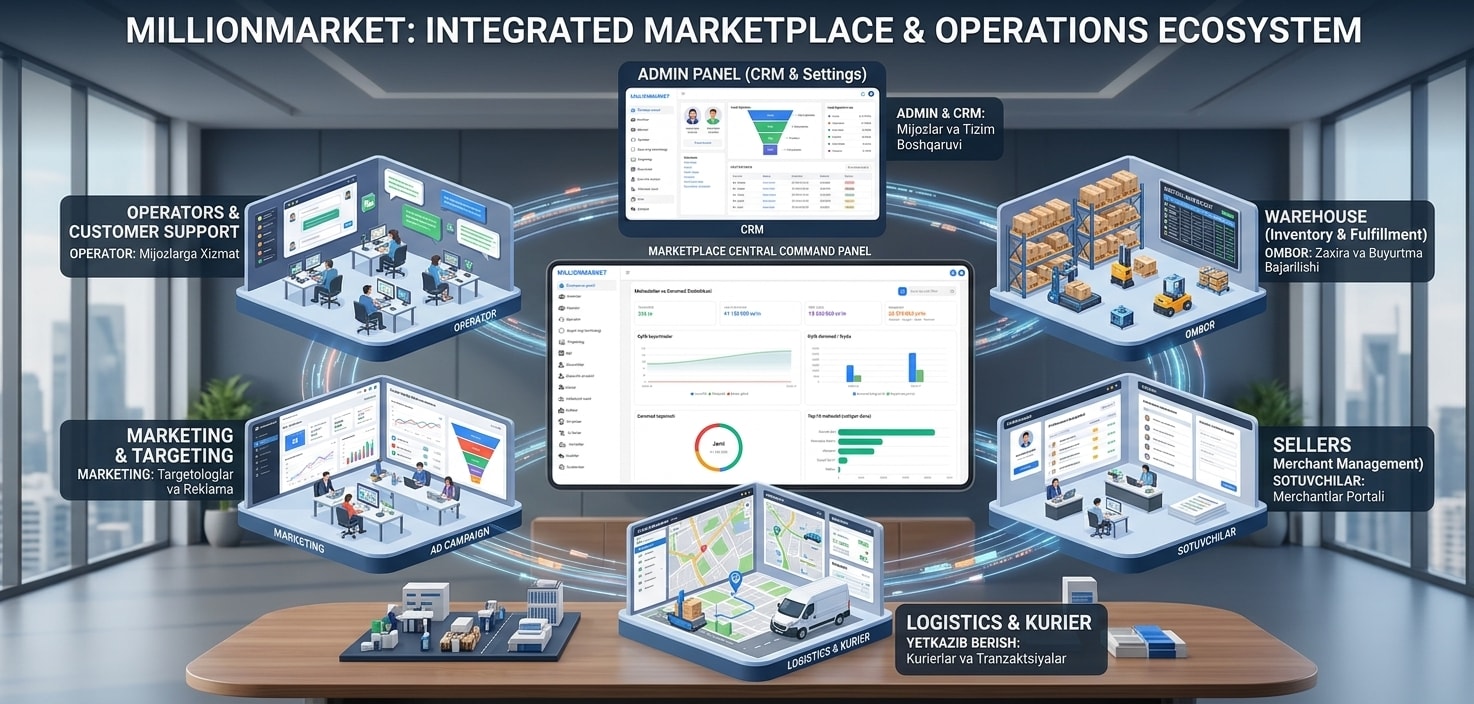
The management system built for Million Market — an example of a CRM/ERP where several departments work in one environment.
MillionMarket CRM
CRM / ERP system
- Task
- Orders, the warehouse, couriers, operators and advertising were all tracked in separate places. There was no way to see the overall picture on one screen.
- Solution
- A centralised admin panel was built: order management, a product catalogue, tracking of courier and operator workflows, and a media-buying panel — each separated by role.
- Result
- The team gained the ability to follow the operational processes of different departments within a single management environment.
Questions about CRM system development
The questions we are asked most often before a project starts, answered directly.
The current tiers are listed by direction above: the Standard tier for a sales CRM starts at 12,000,000 UZS, and the combined sales-and-service direction starts at 18,000,000 UZS. The exact figure depends on user roles, modules, integrations and the volume of data to migrate, so we issue the final quote after reviewing your process.
Services that often go alongside a CRM
A CRM stores enquiries, but they have to come from somewhere. The services below complement it — which ones you need depends on your channels.
Telegram Bot
When you need it
When clients write on Telegram: the bot takes the enquiry and passes it into the CRM as a lead.
AI Agent
When you need it
When answering repeat questions and triaging enquiries is eating into your team's time.
Online Stores
When you need it
When sales happen online — the order goes from the shop into the CRM and on to the operator and warehouse.
Corporate Websites
When you need it
When public information about the company and an enquiry form need a site of their own.
AI Integration
When you need it
When the CRM has to connect to accounting software, an ERP or a partner's system.
Mobile Apps
When you need it
When a manager or field worker spends much of the time out of the office and needs to work fully from a phone.
Worth Reading on This Topic
Before making a decision, these articles may answer your questions.

When does your business need a CRM system?
Are customers getting lost in a spreadsheet and enquiries being forgotten? Those are the clearest signs you need a CRM. Here is when a ready-made CRM works, when you need a custom system — with real prices and timelines.

Opening an online store: how to start selling online for your business
An online store is more than putting products on a website — it becomes a sales channel when the catalog, cart, payments, delivery and admin panel work together. Here is what to prepare, which features you need and where to start selling online.
Let's work out which process in your business belongs in a CRM
In a short conversation we go through your leads, orders, team and existing systems. After that we prepare a CRM structure and a project proposal.